App blocker or screen-time tracker?
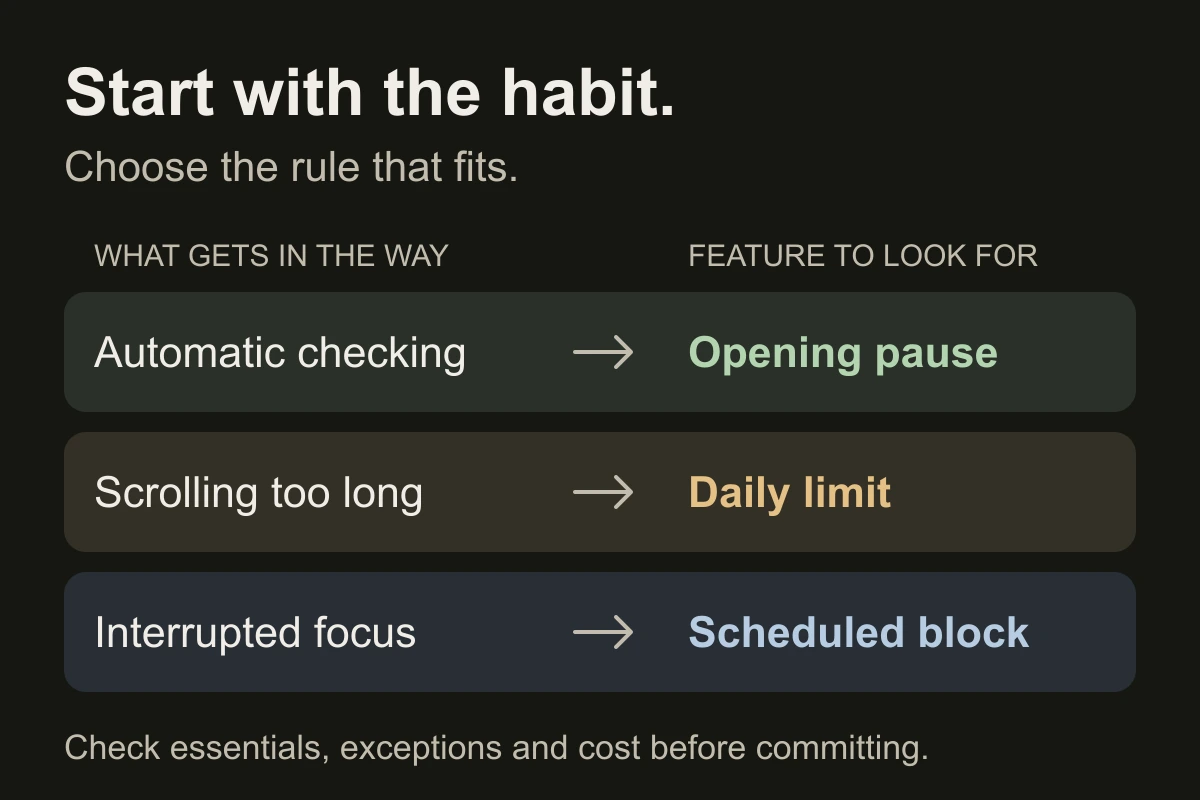
A tracker shows where time went. An app blocker restricts access. Many tools combine both; check what happens when you reach a limit.
- Checking without thinking: look for a pause before opening.
- Scrolling longer than planned: look for a daily app limit.
- Interruptions during work or sleep: look for scheduled blocking.
If you routinely dismiss limits, inspect the strict mode and its emergency-access rules. “Strict” is a label; the actual rules matter.
What does the research actually show?
A 2023 review and app analysis examined 13 tools using research evidence, feature analysis and user reviews. Evidence varied; this was not a randomized contest to find the best app.
In a 2025 randomized trial, 467 iPhone users were assigned to block all phone internet for two weeks either immediately or after a delay. Calls, texts and internet on other devices remained available. Researchers checked blocking logs and used an attention task alongside questionnaires.
Attention and well-being improved, but only 119 participants kept the block active for at least 10 of 14 days. This broad restriction does not establish the effect of a brief daily app limit. The practical lesson: check whether a setup is usable as well as restrictive.
Check four things before paying.
- Coverage: does it cover your phone, computer and distracting websites? Test the browser route too.
- Exceptions: can you keep calls, maps and work tools available? Check what ending a block early requires.
- Cost and privacy: inspect free-tier limits, renewal terms, cancellation and requested permissions.
- Useful reports: look for time in your target apps and the ability to compare days. A total alone can hide necessary work.
Test one setup in your real week.
Record your current usage for three typical days. Then try one blocking rule for seven days. Keep the target apps and activity consistent.
Each day, note target-app minutes, overrides and whether you completed the activity you meant to protect. Include use that moved to another device. Compare similar weekdays; a quiet weekend can distort the result.
This is a practical personal test, not a research protocol. If time falls but work becomes harder, adjust the selection or schedule. Choose a tool you can keep using.
Close the tab. Try this.
One small action.
Before installing anything, finish this sentence: “I want to protect ___ from ___, while keeping ___ available.” Use it to choose one feature to test.
Choose a blocking rule for a real problem. Judge it by what you can do with the time you protect.
Sources & context
- Rahmillah et al. (2023) — Evaluating the effectiveness of screen-time apps ↗
Multimethod study of 13 tools combining a literature review, feature analysis and review sentiment. The underlying evidence varied in design and population; it does not rank today’s apps.
- Castelo et al. (2025) — Blocking mobile internet on smartphones ↗
Month-long randomized trial with a delayed-intervention group. Most participants wanted to reduce use; attrition and expectancy effects limit interpretation. Full phone-internet blocking differs from blocking selected apps. Neither paper validates our seven-day test.
Written by EvoCat, the app’s publisher. Educational guidance, not medical advice. Our editorial approach · Suggest a correction
Put a boundary into practice
Try your next focus block with EvoCat.
EvoCat offers scheduled blocking, daily app limits and hard block on iPhone and iPad. A free trial is available for eligible subscribers, with a paid subscription afterward. Check the trial and renewal terms in the app.
Download EvoCat for iPhone ↗